
iOS 26: What Businesses Need To Know About Apple’s New Filtering Feature
Apple's iOS 26 update introduces new filtering features that could significantly impact how your customers receive business communications. Understanding their implications will help you maintain strong customer connections.
Apple's latest iOS 26 release includes enhanced screening tools designed to give users more control over their messaging experience. When enabled, the Screen Unknown Senders feature automatically sorts incoming messages into separate folders, potentially affecting how customers see your business communications.
The changes primarily impact SMS and MMS messages on iOS devices, with new filtering rules that determine whether your messages appear in the main inbox or get sorted into secondary folders. For businesses that rely on text messaging for customer engagement, these updates require immediate attention and strategic planning.
This guide will walk you through exactly what's changing, how it affects your business communications, and the steps you can take to ensure your messages continue reaching customers effectively.
What’s changing with iOS 26
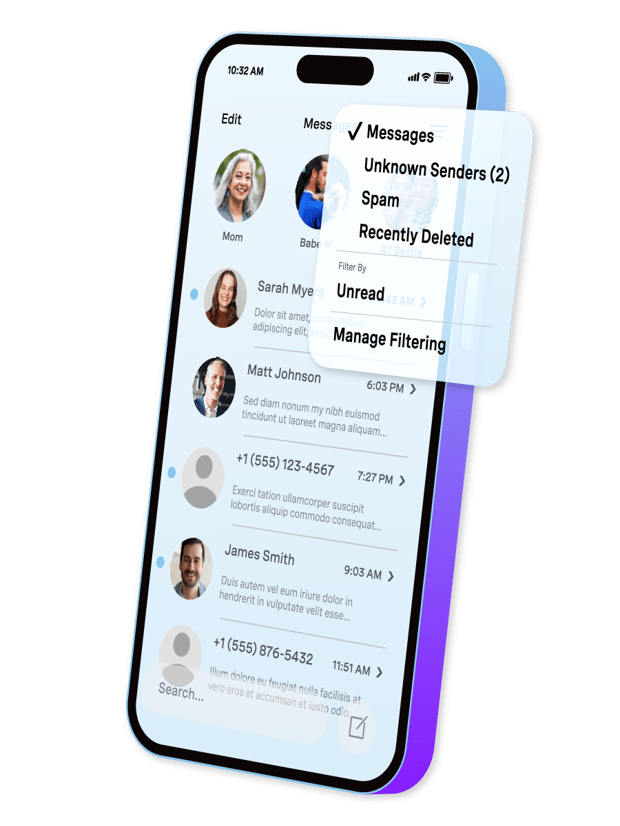
When enabled, the Screen Unknown Senders feature introduces a folder-based system that categorizes incoming messages based on sender recognition. When users enable this feature, their messages get automatically sorted into distinct categories.
The new message organization system
Messages now appear in five separate folders:
Messages folder contains communications from saved contacts, senders marked as "known," and anyone the user has previously messaged. These appear with full notifications and remain highly visible.
Unknown Senders folder receives messages from numbers not saved in contacts and senders the user hasn't previously contacted. These messages trigger only a badge notification without audio or haptic alerts.
Spam folder automatically filters suspected marketing and phishing attempts. Messages here have disabled links and get deleted after 90 days.
Recently Deleted folder stores recently removed conversations for potential recovery.
Unread folder aggregates all unread messages across all categories for easy access.
Critical feature details
The system includes built-in intelligence for time-sensitive messages like verification codes and order confirmations. These bypass normal filtering rules and appear prominently in the main inbox for one hour, regardless of sender recognition status.
Users can customize notification preferences for different message types, including personal communications, transaction updates, and promotional content from unknown senders.
Impact on business communications
These filtering changes create new challenges for customer engagement, even when recipients have explicitly opted in to receive your messages.
Message visibility concerns
Your carefully crafted SMS campaigns might end up in the Unknown Senders folder, where they receive no immediate notification. Customers who previously saw your messages instantly now need to actively check a secondary folder to find your communications.
This delay in message discovery can significantly impact time-sensitive communications like flash sales, appointment reminders, or urgent account notifications. Even loyal customers might miss important updates if they don't regularly check their Unknown Senders folder.
Engagement rate implications
Businesses should expect potential decreases in immediate response rates and engagement metrics. Messages that previously generated quick replies might experience delayed interactions as customers adjust to the new folder system.
The lack of immediate notifications for unknown senders means your messages compete for attention with other filtered communications, potentially reducing their impact and urgency.
RCS and branded messaging considerations
While iOS 26 is expected to include RCS enhancements, including end-to-end encryption, the "Screen Unknown Senders" feature focuses on message visibility and not on blocking RCS messages directly. Rich Communication Services (RCS) or Rich Business Messaging (RBM) should avoid Unknown Sender filtering by including a contact-card in agents. Your branded appearance helps with recognition within the folder, but doesn't bypass the filtering system entirely.
Preparing your business for iOS 26
Success with iOS 26 requires proactive adjustments to your customer communication strategy and opt-in processes.
Strengthen customer relationships
Focus on building recognized sender status by encouraging customers to save your contact information. Include clear instructions in your communications asking recipients to "save this number as [Your Business Name] to ensure you receive all our updates."
Send vCard contact cards through MMS to make it easy for customers to add your business information directly to their contacts. This one-step process eliminates friction and increases the likelihood of achieving known sender status.
Optimize your opt-in process
Implement mobile-originated opt-in methods where customers send the first message to your business number. This approach ensures iOS recognizes the communication as user-initiated, improving delivery to the main Messages folder.
Use "tap-to-join" links on mobile websites that pre-populate SMS messages for easy sending. When customers click these links, their messaging app opens with your number and opt-in message already filled in — they simply need to tap send.
Diversify communication channels
Don't rely solely on SMS for critical customer communications. Integrate RCS, email, push notifications, Branded Calling, and WhatsApp messaging to ensure important information reaches customers through multiple touchpoints.
Use cross-channel messaging to inform customers about SMS delivery changes and provide instructions for finding your messages in the Unknown Senders folder if needed.
Identify yourself and Own Your Brand
Make your messages and calls immediately recognizable by using consistent branding, clear sender identification with name and logo, and familiar messaging patterns. When customers do check their Unknown Senders folder, they should instantly recognize your communications.
Also be sure to prioritize your most critical message types and ensure they follow recognized formats for time-sensitive communications, particularly for verification codes and urgent account updates.
Technical implementation strategies
Several specific technical approaches can help maintain message deliverability and customer engagement post-iOS 26.
Contact card integration
Implement automated vCard delivery for new subscribers, making it effortless for customers to save your business contact information. Include your business name, phone number, and relevant details in a professional contact card format.
Time these contact card deliveries strategically — send them immediately after successful opt-in confirmation to capture customer attention while your brand is top-of-mind.
Smart opt-in flows
Design mobile-responsive opt-in experiences that guide customers through the process of sending the first message to your business. This user-initiated approach satisfies iOS filtering criteria while maintaining compliance with messaging regulations.
Create clear, step-by-step instructions that customers can easily follow, reducing confusion and increasing successful opt-in completion rates.
Message classification optimization
Structure your transactional and verification messages using recognized formats that iOS can identify as time-sensitive. Follow established patterns for order confirmations, appointment reminders, and security codes to maximize automatic recognition.
Divide promotional and transactional messaging among different sender numbers to prevent promotional filtering from affecting critical business communications.
Alternate authentication channels
While Apple claims verification codes and time-sensitive alerts will notify the user and show up in the main Messages folder for the first hour, provided they follow recognized formats, this may be a good time to explore alternative two-factor authentication (2FA) methods.
Rather than relying on SMS for one-time passcodes (OTPs), Silent Authentication provides secure authentication without requiring users to input passwords or verification information. Instead, users are automatically authenticated by their mobile network operators based on their smartphones’ data connection.
Monitoring and measuring success
Track key performance indicators to understand how iOS 26 affects your customer communication effectiveness.
Essential metrics to watch
Monitor message delivery rates, response times, and overall engagement levels across different customer segments. Compare iOS user engagement with Android users to isolate the impact of the filtering changes.
Track contact saving rates and known sender status adoption to understand how successfully customers are following your guidance for maintaining message visibility.
Customer feedback integration
Implement feedback mechanisms to understand customer experiences with your messaging. Some customers might not realize their messages are being filtered, creating opportunities for education and support.
Use customer service interactions to identify messaging issues and provide personalized guidance for ensuring continued communication.
Moving forward with confidence
iOS 26's message filtering represents a significant shift in mobile communication, but businesses that adapt quickly can maintain strong customer relationships. The key lies in proactive preparation and customer education rather than reactive responses to decreased engagement.
Focus on building genuine customer relationships that encourage natural interaction and contact saving. When customers value your communications, they'll take the necessary steps to ensure continued visibility.
Consider these changes an opportunity to refine your messaging strategy, improve customer education, and strengthen your multichannel communication approach. Businesses that successfully navigate this transition will be better positioned for long-term customer engagement success.
Stay informed about iOS 26 developments as this release progresses, as Apple may adjust default settings or filtering criteria based on user feedback and testing results. By maintaining flexibility and focusing on customer value, your business can thrive regardless of platform changes.
This overview represents Apple’s release as of mid-September 2025. Features are subject to change and may continue to evolve in later updates.
Sign up now
Was this helpful? Let's continue your API journey
Don't miss our quarterly newsletter to see how Vonage Communications APIs can help you deliver exceptional customer engagement and experiences on their favorite channels.

Thanks for signing up!
Be on the lookout for our next quarterly newsletter, chock full of information that can help you transform your business.
