Okta MFA without the middleware: Production-ready 2FA in minutes
Okta MFA generates the OTP and the destination number, but it does not send either one. Most teams fill that gap with custom middleware built to catch the Telephony Inline Hook and forward it to a Communications Platform as a Service (CPaaS) provider. Replace that middleware with a no-code connector. Install it, configure the Telephony Inline Hook, connect your credentials, and go live in 15 minutes. Vonage Protection Suite for Okta is the production-ready connector within Network-Powered Solutions (Network API).

-
1
-
2
-
3
-
4
-
5
-
6
-
7
-
8
-
9
Key takeaways
- Okta does not send OTPs natively. Every Okta deployment must bring its own telephony provider (BYOT), and most teams discover this midway through rollout.
- The alternative to custom middleware is a no-code Okta connector installed from the VCR Marketplace, live in four steps and under 15 minutes.
- Two-Layer Fraud Intelligence protects the flow before and during delivery. Identity Insights screens numbers before an OTP is sent, and Fraud Defender Advanced runs AIT detection, burst protection, and geo permissions during OTP delivery.
- Vonage Verify powers every OTP, not plain SMS, adding intelligent routing and automatic SMS-to-voice failover that the single-attempt Telephony Inline Hook cannot provide on its own.
- Pricing is pay per successful conversion with a $0 connector fee, $0 Fraud Defender Advanced, and shared short codes that remove the 10DLC registration step for U.S. OTP delivery.
Okta MFA starts with a gap: Okta does not deliver OTPs
The fact that reshapes most Okta MFA projects is the verification authority, not the delivery channel. Okta generates the one-time passcode (OTP) and the destination number, then hands off. It does not put the message on a carrier. That responsibility is yours.
Okta requires an Okta telephony provider (BYOT)
Okta uses a Bring Your Own Telephony Provider (BYOT) model. To send SMS or voice OTPs, you must connect an Okta telephony provider, wire it to the Okta Telephony Inline Hook, and keep that connection healthy. Teams evaluating Okta multi-factor authentication for SMS and voice usually assume delivery is included. It is not, and the discovery tends to land in the middle of a deployment sprint rather than during planning
Why the gap is a fraud gap, not just a delivery gap
Once you own delivery, you also own the abuse surface. OTP flows are a favorite target. Artificially Inflated Traffic alone cost brands $1.16 billion last year across 35.7 billion fraudulent messages, and 4.8% of global messaging is now fraudulent. SIM-swap fraud compounds the problem, with Cifas recording a 1,055% surge in unauthorized SIM swaps. European guidance is explicit that operators and service providers should check for SIM-swap and porting events through carrier data rather than trusting SMS alone. A raw telephony pipe into Okta gives you none of that intelligence.
The custom middleware problem behind Okta multi-factor authentication
The default answer to BYOT is to build. Engineering teams stand up a service that catches the Okta Telephony Inline Hook, translates the payload, and calls a CPaaS API. On a whiteboard it looks like a weekend. In production it becomes a maintenance liability.
What custom middleware actually costs
Custom middleware for Okta multi-factor authentication carries hidden, recurring costs:
- Build time. Weeks to months of engineering to handle the hook payload, credential management, logging, and error states.
- Fragility. The integration breaks whenever the CPaaS provider changes an API contract, and the failure shows up as users locked out of login.
- No retry logic. The Okta Telephony Inline Hook gives a single-attempt delivery window. If that SMS fails, native Okta has no retry. A missed message is a failed login.
- No fraud controls. Homegrown middleware has no defense against Artificially Inflated Traffic (AIT) or SMS pumping, and no pre-send number screening.
A telephony pipe moves messages. It does not verify people, and it does not defend the flow.
How the Okta connector works: Architecture and four-step setup
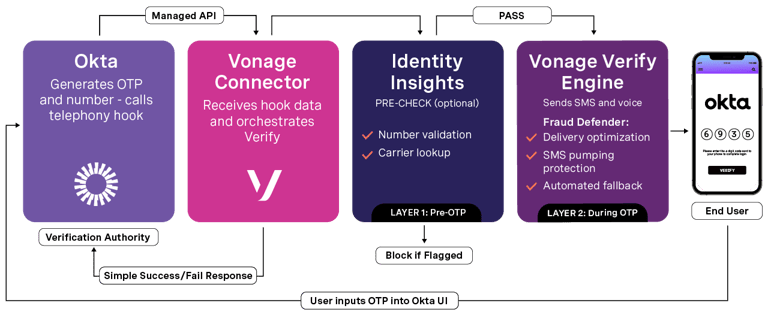
The Vonage Protection Suite for Okta is a self-service, no-code Okta connector that delivers Vonage Verify, Identity Insights, and Fraud Defender into your Okta MFA flow. No custom code, no support tickets, no developer resources required.
The four-step setup, live in 15 minutes
Installation runs through the VCR Marketplace inside the Vonage Cloud Runtime:
- Install the connector from the VCR Marketplace.
- Configure the Okta Telephony Inline Hook in your Okta admin console.
- Connect your Vonage API credentials.
- Receive live authentication within 15 minutes.
A first live OTP typically takes about 15 minutes from install. No code changes to your Okta tenant are needed beyond the standard admin configuration.
Two-Layer Fraud Intelligence: Protection before and during the OTP
Two-Layer Fraud Intelligence pairs a pre-send screening layer with a delivery-time defense layer, so fraud gets addressed both before and during the OTP.
Layer one, pre-OTP: Identity Insights screens the number first
Before any OTP leaves the platform, Identity Insights inspects the destination number. It is optional and billed per request. You enable the checks that match your risk tolerance:
- Number Format validates format, type (mobile, landline, or virtual), and country. No cost.
- Original Carrier identifies the carrier the number was first assigned to. Per request.
- Current Carrier identifies the current carrier and surfaces porting events, a strong SIM-swap signal. Per request.
Flagged numbers are blocked before you ever pay to send a passcode.
Layer two, during OTP: Fraud Defender Advanced defends delivery
During delivery, Fraud Defender Advanced runs at no additional cost:
- AIT detection identifies and blocks Artificially Inflated Traffic automatically, so bots cannot quietly run up your messaging bill.
- SMS burst protection detects anomalous volume spikes and rate-limits suspicious traffic.
- Geo permissions restrict OTP delivery to expected countries and regions.
Layer
When it runs
What it does
Cost
Layer 1: Identity Insights
Pre-OTP
Number format, original and current carrier lookup, porting and SIM-swap signal, block if flagged
Number Format $0; carrier checks per request
Layer 2: Fraud Defender Advanced
During OTP
AIT detection, SMS burst protection, geo permissions
$0, included with Verify
Every passcode routed through the connector runs on Vonage Verify, not raw SMS. That distinction is authentication-grade delivery versus best-effort message delivery.
Okta MFA hands off and Vonage Verify finishes the job
The Okta Telephony Inline Hook is a single attempt. Vonage Verify adds what a single attempt cannot:
- Adaptive routing selects the fastest, most reliable delivery path for each OTP.
- Automatic SMS-to-voice failover with no user intervention, so a failed SMS does not become a failed login.
- 200+ country coverage for fixed and mobile numbers, with automatic language localization and sender ID compliance.
- Pay only for successful verifications, so undelivered attempts do not bill.
This is the difference between an OTP delivery pipe and an authentication engine sitting behind your Okta MFA experience.
No 10DLC for U.S. OTP delivery
U.S. OTP delivery normally means 10DLC registration with the carriers, a process that can stall a launch for weeks. The Vonage connector uses shared short codes for OTP delivery in the U.S. Customers do not need to complete 10DLC registration.
Removing that step is often the difference between going live this week and going live next quarter.
Okta MFA pricing with no platform fee
Pricing for Okta MFA through the connector is built to align cost with outcome. You pay when authentication succeeds, and Fraud Defender Advanced is included.
Component
Price
Connector Fee
$0, no recurring cost
Verify Platform Fee
Pay per Conversion (charged only on successful auth)
Fraud Defender Advanced
$0, included (AIT detection, SMS burst protection, geo permissions)
Identity Insights: Number Format
$0
Identity Insights: Original Carrier
Per request
Identity Insights: Current Carrier
Per request
Platform minimum
None
Messaging and voice rates follow standard API usage fees. There is no platform minimum and no upfront cost.
Get started with production-ready Okta MFA
Install the Protection Suite for Okta from the VCR Marketplace, configure the Telephony Inline Hook, connect your credentials, and send your first OTP inside 15 minutes.
- Install the Vonage Protection Suite for Okta from the VCR Marketplace to secure your active authentication flows.
- Read the set-up guide for the Protection Suite for Okta for the full installation and configuration steps.
- Talk to a Vonage Okta specialist to map out the implementation for your team and cover any unique enterprise requirements.
Do a quick self-check before you book time. Stop and ask yourself a few questions. Are you running Okta MFA with SMS OTP today? Who is your current telephony provider for Okta? Have you built custom middleware between Okta and your CPaaS? Have you completed 10DLC registration for US OTP delivery? Have you seen AIT, SMS pumping, or SIM-swap activity on your Okta flow? If any answer gives you pause, the connector is the faster, safer path.
Frequently asked questions about Okta MFA
No. Okta generates the passcode and destination number and then calls the Telephony Inline Hook, but it does not send the message. You must connect an Okta telephony provider (BYOT) to actually deliver the OTP.
BYOT stands for Bring Your Own Telephony Provider — the service that handles the actual routing and delivery of text messages and voice calls for multi-factor authentication. BYOT is an emerging term, similar to Bring Your Own Device or Bring Your Own Key for encryption. It means you supply your own SMS and voice delivery service behind Okta MFA instead of relying on default routing. The Vonage connector fills that role seamlessly. It hooks straight into the native Okta Telephony Inline Hook framework, routing your traffic across direct carrier networks without requiring your team to build or patch custom middleware.
Four steps. Install from the VCR Marketplace, configure the Telephony Inline Hook, connect credentials, and go live in about 15 minutes.
It is the Okta mechanism that hands off OTP delivery to an external provider, passing the passcode and phone number to your endpoint. It is single-attempt. It has no native retry if a message fails.
Layer one (Identity Insights) screens the destination number before any OTP is sent, blocking flagged numbers and detecting porting events. Layer two (Fraud Defender Advanced) runs AIT detection, SMS burst protection, and geo permissions during delivery.
No. The connector uses shared short codes for U.S. OTP delivery. You skip 10DLC registration.