
How Messaging APIs Can Enable Unified Customer Support Centers
Customers today expect fast, consistent support across every communication channel.
SMS, RCS, chat, and social — messaging APIs help you easily connect everything in one place, reduce response times, and streamline your team’s workflows, all while ensuring seamless customer CX.

How to deal with multichannel support mess (and how messaging APIs solve it)
If your support team juggles email, SMS, WhatsApp, RCS, chat, social messages, and more, you’re not alone. Many companies face the same challenge. Customers reach out on different channels, and agents try to keep up with all of them. The result? Slow response times, missed conversations, redundant questions, and frustrated customers.
It doesn’t have to be this way.
With the right tools, you can connect all your customer conversations in one place. Messaging APIs make this possible. They give developers a simple way to plug messaging into your systems without building everything from scratch.
Instead of switching between tabs and tools, your agents have one view and all the history of the conversations. Customers receive faster replies. Your support team works more efficiently across channels they already use, and rapport grows between your brand the their customer..
What are messaging APIs?
A messaging API is a tool that helps businesses send and receive messages across digital channels. It gives developers a set of building blocks, called endpoints, that connect your systems to messaging platforms like RCS, WhatsApp, SMS, MMS, Facebook Messenger, and in-app chat.
Instead of building the full infrastructure to support real-time messaging, developers can use a messaging API to access that functionality with a few lines of code. This saves time, reduces costs, and helps teams scale faster.
Messaging APIs do more than just send messages. They can:
Route messages to the right users or systems
Confirm if a message was delivered or read
Trigger responses automatically
Support media like images, videos, and documents
Provide delivery data and error reporting
By handling the hard parts behind the scenes, messaging APIs let businesses focus on creating better customer experiences, not managing backend systems or carrier relationships.
How messaging APIs work in customer support workflows
A common workflow using SMS
Let’s say a customer sends a support request by text message. Here's how the process can work with a messaging API:
A support number is published. You promote a virtual number or shortcode that customers can text for help.
A customer sends a message. They describe the issue in a short text and hit send.
A ticket is created automatically. Your system uses the API to open a case in your help desk software, like Zendesk.
The phone number is linked to the ticket. This allows agents to match follow-up texts or calls to the same issue.
An automated reply is sent. The customer receives a case number, a helpful link, and an estimated wait time.
An agent takes over. A support rep picks up the thread and continues the conversation through SMS, or switches to voice if needed.
Throughout this process, the messaging API helps manage routing, delivery, and updates. Everything happens in real time, without forcing the customer to switch channels or repeat themselves.
Extending to other channels
The same workflow can apply to other platforms. With a single API, businesses can manage conversations on WhatsApp, RCS, Facebook Messenger, or in-app chat. Features like typing indicators, read receipts, and media sharing add extra context and convenience.
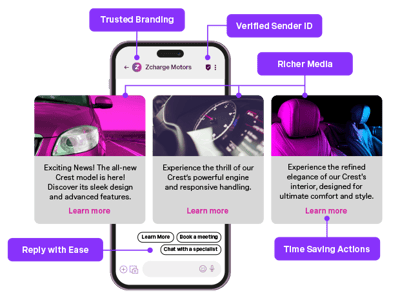
Messaging APIs also support rich media formats. MMS allows teams to send images or documents, while RCS supports branded content, carousels, and interactive replies that create a more engaging experience.
Messaging APIs make it easier for support teams to meet customers where they are, while keeping the experience connected, efficient, and transparent.
Types of messaging APIs
Messaging APIs come in different types depending on the communication channel and the use case. Each type offers unique features that can support everything from simple notifications to rich, interactive conversations.
SMS APIs
SMS APIs allow developers to send and receive text messages through software. These are often used for alerts, reminders, two-factor authentication, and customer support. SMS has a wide reach and high open rates, making it ideal for time-sensitive messages.
MMS APIs
MMS APIs support messages that include media such as images, video, and audio. They help businesses create a more visual customer experience. MMS is often used for promotional messages, customer support with image sharing, and branded updates.
RCS APIs
Rich Communication Services (RCS) APIs offer a more interactive alternative to SMS and MMS. They support branded content, read receipts, suggested replies, and carousels. RCS can make messaging feel more like an app experience, giving customers clear and engaging ways to interact.
Chat and in-app messaging APIs
These APIs (like WhatsApp or Facebook Messenger) power real-time chat inside web or mobile apps. They can include typing indicators, message history, online status, and user profiles. In-app messaging is helpful for SaaS platforms, mobile-first businesses, and apps that need direct user engagement.
Customer support and help desk APIs
Some messaging APIs are designed specifically to manage customer support sessions. These often include tools to start and end conversations, assign tickets, and send updates using webhooks. They can also integrate with help desk platforms like Zendesk and Salesforce to keep everything in sync.
By combining different types of messaging APIs through a single interface, businesses can build a flexible and connected support system that meets customers on the channels they prefer.
 Customer Engagement
Benefits of messaging APIs for support centers
Messaging APIs do more than enable chat. They help support teams work smarter, reduce manual effort, and deliver better customer experiences across every channel.
Here are five ways messaging APIs can make a real impact on support operations:
1. Faster response times and less back-and-forth
When all customer messages arrive in one place, agents can respond quickly without switching platforms. Real-time features like typing indicators and read receipts reduce delays and help conversations move forward naturally.
2. Full visibility across every channel
Support teams get a complete view of the customer journey, no matter where the conversation started. That means fewer missed messages, more relevant replies, and better handoffs between agents.
3. More control and insight
Delivery tracking, read status, and reporting tools make it easier to understand what’s working and where to improve. Managers can spot patterns, track performance, and optimize the customer experience over time.
4. Built-in automation to reduce manual tasks
Messaging APIs can create tickets, send follow-ups, and handle simple inquiries automatically. That frees up agents to focus on more complex issues while helping customers get answers faster.
5. Reliability, security, and scale
With features like authentication, token management, and adaptive routing, messaging APIs are built to grow with your business. They help maintain consistent performance, even during spikes in volume or across global teams.
Use case: Migrating to a unified messaging platform
Many support centers start small, one tool for SMS, another for live chat, and add more as customer expectations grow. Over time, this leads to a patchwork of disconnected systems. Each tool may work well on its own, but together they can slow down teams and confuse customers.
Moving to a unified messaging platform helps close those gaps and creates a more consistent experience across every interaction.
Why support teams consider switching
Here are common signs it may be time to rethink your messaging setup:
Too many tools to manage across channels
Disconnected workflows between messaging and ticketing systems
No central view of message history or delivery
Rising costs from managing multiple vendors
Limited IT capacity to maintain or scale the stack
These challenges not only drain internal resources, they can lead to slower support and a frustrating customer experience.
What changes with a unified messaging platform
A single messaging API brings your communication tools under one roof. Whether it’s SMS, MMS, RCS, WhatsApp, Messenger, or in-app chat, support teams can:
Automate ticket creation from any channel
Route inquiries to the right agent
Access full message history in one view
Send updates and confirmations without manual steps
Support global delivery, compliance, and security from day one
This shift helps reduce complexity, improve handoffs, and give teams the structure they need to scale effectively.
Making migration easier
Migrating systems may sound like a big lift, but the right API can ease the process. Look for providers that offer:
Instant number provisioning or porting
Prebuilt integrations with help desks and CRMs
Webhooks for syncing real-time events
Sandbox environments for testing and QA
When the tools support your team, not the other way around, migration becomes much easier to manage.
Before making the switch, it helps to ask the right questions to make sure the platform fits your team’s needs now and into the future.
Key questions to ask before you choose a messaging API
Not all messaging APIs are built the same. Some focus on a single channel. Others offer broader coverage but lack tools for customer support. Before choosing a solution, it helps to ask the right questions.
Here are key areas to consider when evaluating a messaging API for your support center:
1. Does it support all the channels your customers use?
Look for an API that can manage SMS, MMS, WhatsApp, Facebook Messenger, RCS, and in-app chat. The more channels you can support through a single interface, the easier it will be to scale and maintain.
2. Can it integrate with your help desk or CRM?
Your messaging tools should connect with platforms like Zendesk, Salesforce, or other systems your team relies on. This keeps conversations and tickets aligned and helps agents work faster.
3. What automation and tracking features are available?
Ask if the API can automate tasks like sending case updates or routing messages. Also check whether it supports delivery receipts, read status, and reporting tools to track message outcomes.
4. Is it secure and built for scale?
Security features like authentication, encrypted transport, and token validation should be built in. The API should also offer high reliability and be able to handle message spikes without delays.
5. How easy is onboarding and migration?
A good API should provide clear documentation, test environments, and tools that make it easier to migrate from your current setup. Features like number provisioning, webhooks, and prebuilt integrations can save time for your team.
These questions help you evaluate not just what the API can do today, but whether it will support your team’s needs in the long term.
Why unified messaging is key to modern customer support
Customer expectations are rising. They want quick, consistent answers on the channels they already use, whether that is SMS, chat, or social messaging.
When teams rely on disconnected tools, even small support issues become harder to manage. Agents lose context. Conversations get delayed. Customers are left repeating themselves.
A unified messaging approach brings clarity to all of it. By managing every conversation through a single system, support teams can improve speed, accuracy, and visibility across their entire operation.
This is not just about technology. It is about giving your team a structure that helps them do their best work and giving customers a support experience they can trust.
If your team is exploring how to bring everything together, Vonage Messages API offers a flexible starting point that works with your existing tools and grows with your needs.
Sign up now
Was this helpful? Let's continue your API journey
Don't miss our quarterly newsletter to see how Vonage Communications APIs can help you deliver exceptional customer engagement and experiences on their favorite channels.

Thanks for signing up!
Be on the lookout for our next quarterly newsletter, chock full of information that can help you transform your business.
Frequently asked questions about messaging APIs
A messaging API is a software tool that allows developers to send and receive messages through platforms like SMS, chat, and social apps. It handles the behind-the-scenes work so teams can add real-time communication to apps or systems without building the full infrastructure.
Messaging APIs bring all customer conversations into one system. This helps support teams respond faster, keep message history in one place, and avoid asking customers to repeat themselves. The result is quicker service and a better overall experience.
Yes. Many messaging APIs support integrations with platforms like Zendesk, Salesforce, and other help desk tools. These connections make it easier to create tickets, route messages, and keep conversations linked to customer records.
Modern messaging APIs support a wide range of channels, including SMS, MMS, WhatsApp, Facebook Messenger, RCS, and in-app chat. Some also support voice or email to help create a complete customer communication system.
