Business Phone App
Would you like to consolidate all of your communications into one single, unified business phone solution that does it all?
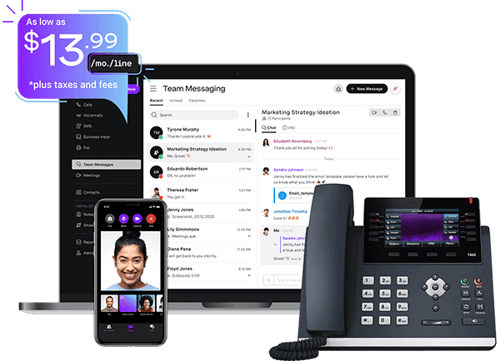
With Vonage Business Communications (VBC), you get both a mobile and a desktop business phone app, meaning you can send and receive calls and messages, share media, and even join video meetings from a single account that works across multiple devices.
Reach out to a Vonage expert today to find out how VBC can help your teams connect anywhere, anytime.

Thanks for reaching out!
We'll get back to you as soon as we can. In the meantime, feel free to explore more about Vonage and how we're making communications more flexible, intelligent, and personal so our customers can stay ahead.
A business phone number app and a whole lot more
Thousands of organizations just like yours have discovered the benefits of Vonage Business Communications (VBC) — and the VBC Mobile App that means you can take it with you wherever you go. Here are just a few of the features you’ll be able to take advantage of:

Business Phone Numbers
Need a dedicated local phone number to help establish your business in a specific region? That’s no problem with VBC. When you sign up, you’ll get a main company phone number and one extra local phone number for the area of your choice as part of the package.

Desktop App
Access all your calling, messaging, video conferencing and CRM integrations from one single dashboard with the VBC Desktop App. You can use it to schedule meetings, download and share transcripts of key conversations, or simply send and receive business calls and messages from your laptop or desktop.

Mobile App
Working remotely or traveling on business? Simply log in to your account on-the-go with the VBC Mobile App. Make and receive calls, send messages from your main company number, share image attachments with your team, and join video meetings from anywhere, anytime.
Multi-Line Phone System
Switch between devices without ever having to log in all over again with the VBC Multi-Line Phone System. You can connect multiple devices on the same extension, making it simple to use the same phone number for your deskphone, mobile, and laptop for maximum convenience.
Call Forwarding
Stay connected wherever you are thanks to Call Forwarding. You can choose between sending calls to a specified extension, a staggered series of up to five different ones, or even a whole group of other extensions at once so your team can pick up any crucial incoming business calls if you’re focusing on other tasks.
Call Flip
Need to transfer a call to one of your other devices mid-conversation? With the Call Flip feature, it’s simplicity itself. Flip calls from your deskphone to your mobile or vice versa in seconds, without the person you’re speaking to being able to detect any interruption whatsoever.

Receptionist Console
Empower your front-of-desk employees to manage high call volumes more efficiently with the Receptionist Console add-on. Assign the service to one user extension, and it will be able to handle up to 50 concurrent calls, making it ideal for dealing with unexpected call volume surges.
Virtual Voicemail
Access your messages from any location with the VBC Virtual Voicemail feature. It’s a cloud-based digital voicemail service that works in parallel with the VBC Desktop and Mobile Apps so you can listen to important messages anytime. You can also use it with your deskphone, so it gives you plenty of flexibility.
Team Messaging and Chat
Communicate with your colleagues using any device in real time with top-tier Team Messaging and Chat functionality. You can send or receive messages, share files, or jump on a video conference whenever you want through the VBC Desktop and Mobile Apps.
Why should a business utilize phone apps?
Dedicated business phone apps offer companies a number of advantages that more traditional communications solutions don’t. The key is that with a cloud-based, VoIP system like VBC which offers both a mobile and desktop app, your employees aren’t tied to using a single device. Instead, the solution works across multiple devices, each of which they can use to access their account.
This has a variety of benefits, including:
1. Remote and hybrid working
The business world has changed beyond all recognition over the past decade. With ever more companies choosing to follow a remote or hybrid working model, it’s essential to adopt a communications platform that fits. Cloud-based business phone applications enable teams to call, message, and join meetings no matter where they are, giving your employees the chance to collaborate effectively no matter where they’re located.
2. Workforce mobility
One of the big advantages of remote working is that it supports a high level of workforce mobility. From the employee’s point of view, this can make working for a company that offers it more attractive, since it can help contribute to a better work-life balance. In turn, this broadens the potential hiring pool for companies and supports better employee retention rates. But this all depends on having the right communications solution to make it viable.
3. Location-independent working
Even for companies that prefer all their employees to work on site, business phone apps are a valuable investment. After all, there will still be times when it’s not possible for everyone to be sitting at their desk. If a manager needs to share files or have a conference call with other team members while traveling on business, it’s much more straightforward to do that with a dedicated VoIP-based business app solution than to use a mixture of channels that aren’t properly integrated.
4. Scalability
There’s also the question of scalability. Traditional landline systems are difficult to scale up fast if your company is in a rapid growth phase. You need to install new extensions and purchase phone equipment for each new employee, and that takes time and money. On the other hand, using an app for business phone number generation couldn’t be easier. You simply add as many extra extensions as you need to the account via the admin dashboard, and you’re ready to go.
How to know if your company needs a phone app for business
The decision to use a business phone solution is a significant commitment, so it’s crucial to get it right. For smaller companies, in particular, it may be more difficult to assess whether the investment will be worthwhile.
Could you make do with just using your personal cell number? Would you be better off with a simple business phone app solution that lets you take a business number with you wherever you go? Or would it make sense to invest in a cloud business phone solution like VBC that you can use via physical desk phones or PCs in your office, on laptops and tablets, and on your cell?
Before you make your ultimate decision, it’s important to take these factors into account:
Call volume: If your company experiences high call volumes, or unpredictable peaks and troughs in the number of calls received, a business phone solution can help you manage them more efficiently. Look for features like a Virtual Receptionist, which takes much of the load off busy teams, allowing them to focus on core work tasks.
Mobile working: For remote teams or for employees who are often out of the office on business, a dedicated business phone app is indispensable when it comes to keeping in touch. Unless your staff are always on the move, though, a solution like VBC, which you can use with your physical devices in the office too, could be the smartest choice.
Separate phone numbers: Most people prefer to keep their personal and professional numbers separate. With a business phone app or a more holistic platform like VBC, this is simple and convenient to do. You can use more than one number on your mobile phone, so you don’t need to switch between two different devices.
Record-keeping: For many businesses, it’s crucial to be able to keep a record of phone conversations to refer to later. A business phone solution that supports call recording can be a huge timesaver, enabling you to revisit calls and review them as needed.
Why choose VBC to get the best business phone app?
There’s a lot to consider when you’re selecting a business phone app provider. Here are a few more reasons why choosing a cloud business phone solution like VBC, which provides a business phone app and a whole lot more besides, may be the best choice for your business:
Secure: VBC takes a security-first approach to communications, meaning all your information is kept safe from unauthorized personnel. It uses top-end security tools and technologies to safeguard your data at all times.
Compliant: Depending on your industry, you may have very specific regulatory compliance requirements. That’s no problem with VBC, which comes with a variety of compliance certifications including ISO 27001, PCI-DSS, SOC, HITRUST, CSA STAR, and HIPAA.
Service-oriented: VBC’s customer support is second to none. As a Vonage client, you’ll have access to a broad range of resources including phone and chat support, an on-demand knowledge hub, our community forum, and more.
Integration-rich: One of the most important elements of any communications solution is how well it integrates with your other business tools. VBC comes with a wide variety of integrations straight out of the box. From highly popular software such as the Slack messaging platform and the Salesforce CRM, to industry-specialist tools like Bullhorn and VisuWell, VBC provides you with a huge range of business tool integration options.
Supercharge collaboration with the right business phone solution
Empower your employees to connect and collaborate more effectively than ever with a business phone solution that delivers everything your company needs in a single, unified platform. Switching to VBC will help your teams keep in touch anytime, anywhere.
Want to know more? Simply reach out to a Vonage expert today to find out how VBC can take your communications to the next level.
Ready to start calling with Vonage?
Compare plans and buy online Schedule a conversation 1-855-430-6401Still have questions about business phone apps?
VBC users can select from a variety of business phone number options. As well as the main business phone number you’ll get when you sign up, you’ll also be eligible to receive a local phone number at no extra charge. In addition, you can access other types of business phone number as an optional add-on including toll-free numbers for your customers and international numbers.
Different businesses have different needs, so it’s crucial to choose a phone solution that’s the right fit for your company. For small businesses, VBC—and the VBC Mobile App that it offers—is an excellent option thanks to its flexibility. You only pay for the features you need, so it’s a budget-friendly choice. In addition, you benefit from top-end security and responsive customer support, as well as a huge number of software integrations as standard.
If your chosen business phone provider includes a mobile app as part of its package, like Vonage, it couldn’t be simpler. Because VBC is cloud-based, there’s no need to buy specialized equipment. You simply sign up online, download the software and apps, configure your account, and you’re good to go.
The cost varies widely depending on the communications solution provider and whether a mobile phone app comes standard as part of their packages. VBC offers three tiers of service starting at $13.99 per line, per month for the basic platform, up to $27.99 per line, per month for the full Advanced package. All tiers support both mobile and desktop apps.
Absolutely. Security is a key focus of the VBC platform and that extends to the mobile and desktop apps. Vonage invests in continuous benchmarking of all its security and privacy procedures, and these are independently audited by third-party testers. It also meets the toughest regulatory compliance standards including GDPR and HIPAA.
With a dedicated phone app, small businesses can reap the benefits of increased efficiency, higher productivity, and more effective collaboration across teams. That’s because when you can access your communications across multiple devices, your staff can connect with each other more quickly and easily, regardless of where they’re located.
